12 workflows, one ecosystem
Each workflow handles one stage, then passes the baton. Data flows through with statuses that let us track, retry, and recover from failures.
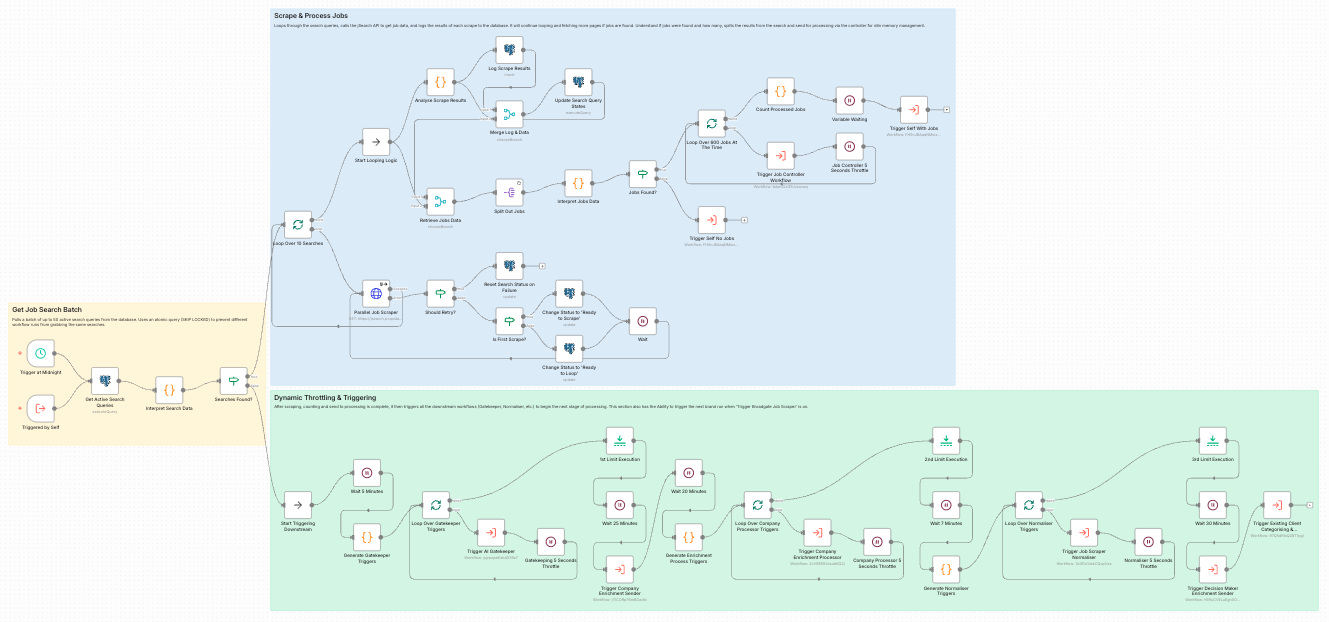
The Job Scraper workflow showing the full scraping and processing pipeline
Naming Convention
[stage].[substage] | [Client] [Description] | v[version]
Every workflow follows this pattern. It makes the ecosystem navigable at a glance.
1.0 | Job Scraper | v3
5.1 | Existing Client Checker | v2
Why it matters: With 12+ workflows, you need to instantly know what runs in what order. The stage number tells you the sequence, the description tells you the purpose, and the version tracks iterations.
Job Scraper
This is the entry point. The workflow runs once daily, pulling all configured searches which then trigger multiple scrapes downstream. It covers hundreds of targeted search queries for different job titles, locations, and industries, deduplicates against existing records, and stores raw job data in the database.
Key Features
- Batch processing to stay within API limits
- Pagination handling for complete coverage
- Self-triggering for continuous operation
- Dynamic throttling based on volume
Technical Notes
- PostgreSQL row-locking prevents duplicate processing
- Status-based state machine for tracking progress
- Rate limiting to stay within API quotas
- Automatic retry on transient failures
Job Processor
Raw jobs often have messy data. This stage cleans company names, extracts domains, handles duplicates, and creates/links company records. Controller workflow (1.2) manages batching, processor workflow (1.3) handles the actual work.
Processing Steps
- Company name extraction and cleaning
- Domain extraction from job URLs
- Duplicate company detection
- Company record creation/linking
Why Split?
Controller handles orchestration and error recovery. Processor focuses on data transformation. If the processor fails mid-batch, the controller can restart from where it left off.
AI Gatekeeper
Not every job is relevant. This workflow uses AI to normalise job titles, check relevance against the Ideal Customer Profile, categorise jobs, and filter out noise before expensive enrichment.
Three AI Tasks
- Normalise Title: "Sr. SWE (Remote, $150k)" → "Senior Software Engineer"
- Gatekeeper: Is this job relevant? true/false
- Categorise: Which business category? (e.g., "Data", "DevOps")
Rejection Tracking
Rejected jobs aren't deleted. They go to a discarded_jobs table with the rejection reason. This lets us audit AI decisions and refine prompts over time.
Company Enrichment
Only companies not already in our system are sent to Clay for enrichment. We use fuzzy matching on name and domain against CRM data to check. Companies already in the CRM skip this stage entirely and go straight to lead tagging. For new companies, we use two different Clay tables: one for companies with domains, one without.
Two Enrichment Paths
- With Domain: Higher accuracy, more data points
- Without Domain: Uses company name + location for matching
- In CRM: Skip enrichment, go to lead tagging
Webhook Pattern
Clay returns data via webhooks. The webhook stores everything it catches, then a separate automation triggers to inject them into the database. This "fill and empty the bucket" approach reduces database calls to one controlled portion of the day.
Jobs Normaliser
Once companies are enriched, we go back to the jobs and extract detailed information from the raw job description: skills, salary, benefits, work mode, experience requirements, and normalised location.
Extracted Fields
- Main tasks and responsibilities
- Required skills (comma-separated)
- Salary range and currency
- Benefits offered
- Minimum years of experience
- Work mode (Remote/Hybrid/On-site)
- Employment type (Contract/Permanent)
Location Normalisation
Locations come in messy: "NYC", "New York, NY", "Remote (US)". A separate AI node normalises to city/country/country_code, then we look up the country ID for CRM integration.
Lead Tagging
This is a separate branch for companies already in the CRM. They skip Clay enrichment and come directly here. We query the CRM for relationship signals: recent placements, interviews, meetings, notes. This determines the A/B/C/D priority tag for routing.
Priority Tags
- A-Lead: Strong recent relationship signals
- B-Lead: Moderate engagement history
- C-Lead: Some historical activity
- D-Lead: Exists in CRM, minimal history
Job Grouping
Jobs are grouped by client + country + category. One package per group. This prevents creating duplicate leads for the same opportunity.
Decision Maker Enrichment
For new companies (not existing clients), we need decision makers to contact. This stage sends companies to Clay for contact enrichment, then processes the returned contacts with email and phone verification.
Contact Data
- First/last name
- Email (verified)
- Job title
- LinkedIn URL
- LinkedIn summary (for personalisation)
Verification
Unverified emails destroy sender reputation. Clay's waterfall tries multiple verification services. Only contacts with verified emails proceed to outreach.
Email Campaign Push
The final stage. Contacts with verified emails are pushed to Smartlead (or similar) for automated email sequences. Each contact is matched to the appropriate campaign based on job category.
Campaign Matching
- Campaign per job category (Data, DevOps, etc.)
- Personalisation fields: name, company, job link, location
- LinkedIn summary for icebreakers
Status Tracking
Every contact has an outreach_status: Pending → Processing → In Campaign → Replied/Bounced/Unsubscribed. Full visibility into what happened.